DHT11 Temperature & Humidity Web Server
Read a DHT11 and show live temperature & humidity on a page that refreshes every 10 seconds.
⬇ Download the sketch
Save
Project_9_ESP32_DHT11_Web_Server.ino, then open it in the Arduino IDE (setup: Project 0b). Needs the DHT, Adafruit Unified Sensor, ESPAsyncWebServer + AsyncTCP libraries and your Wi‑Fi credentials.
1 · The sensor & auto‑updating pages
The DHT11 is a small, slow, cheap sensor that reports temperature (°C) and relative humidity (%) over one data wire. Read it every couple of seconds — no faster.
To refresh without reloading, the browser polls (like Project 8): two timers fetch /temperature and /humidity every 10 s and drop the numbers into the page:
setInterval(function () {
  xhttp.open("GET", "/temperature", true);   // fetch just the number
  ...
}, 10000);                                     // every 10 seconds
2 · Install the required libraries
- DHT sensor library (Adafruit)
- Adafruit Unified Sensor (dependency)
- ESPAsyncWebServer
- AsyncTCP (ESP32)
The first two are in the Library Manager; the async pair install as ZIPs (as in Projects 7–8).
3 · Parts & wiring
| Qty | Part | Notes |
|---|---|---|
| 1 | ESP32 · breadboard · jumper wires | — |
| 1 | DHT11 module | 3‑pin: −, +, S |
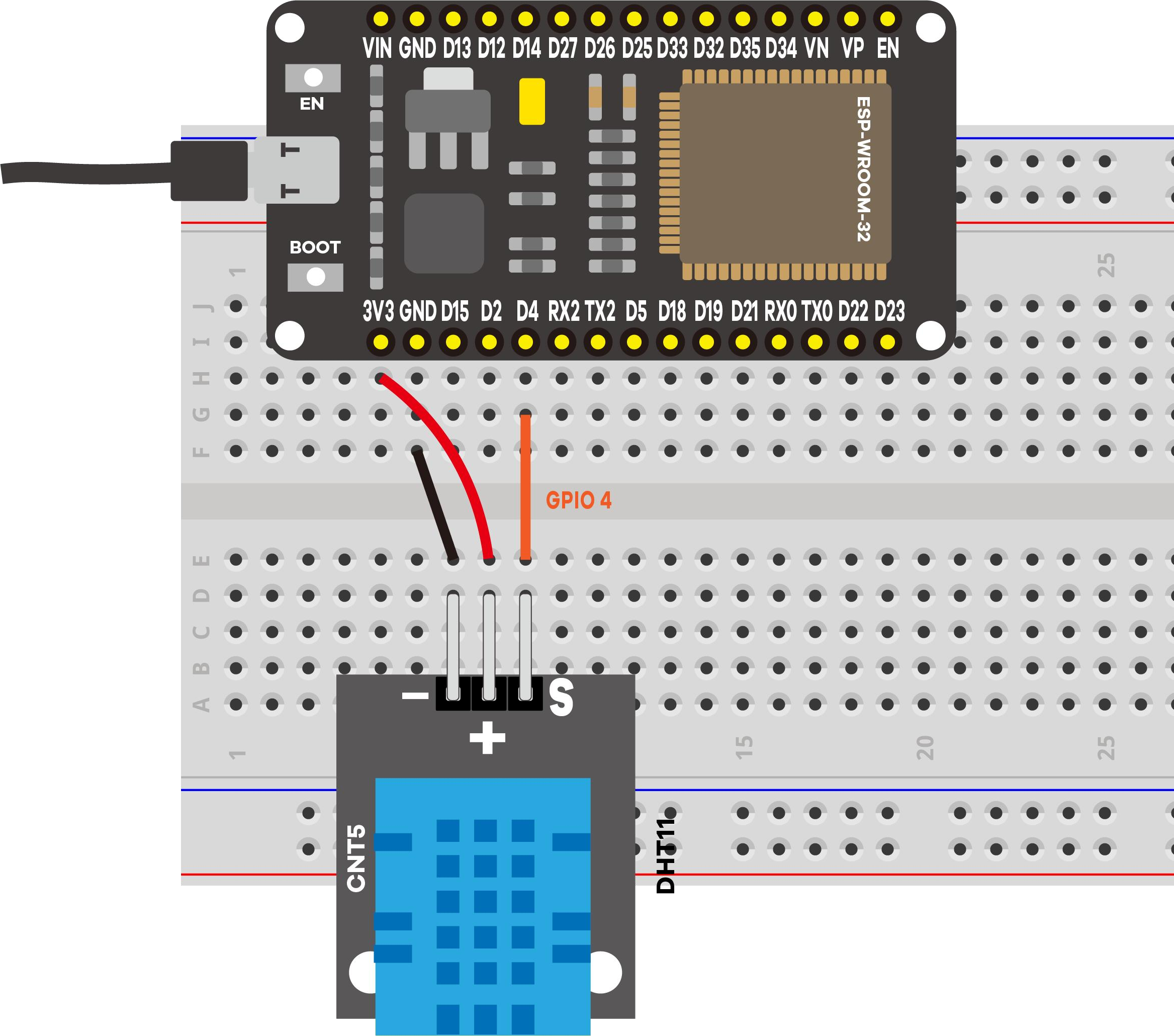
This kit's DHT11 is a 3‑pin module with the pull‑up built in, so it runs straight off 3.3 V — no extra resistor.
4 · Upload & use
Set your Wi‑Fi credentials, upload, open Serial Monitor at 115200, press EN/RESET:
==============================================
 Project 9: ESP32 DHT11 Web Server
==============================================
DHT11 data -> GPIO 4
Connecting to Wi-Fi: MyNetwork
....
Wi-Fi connected!
Open this address in your browser:  http://192.168.1.42
----------------------------------------------
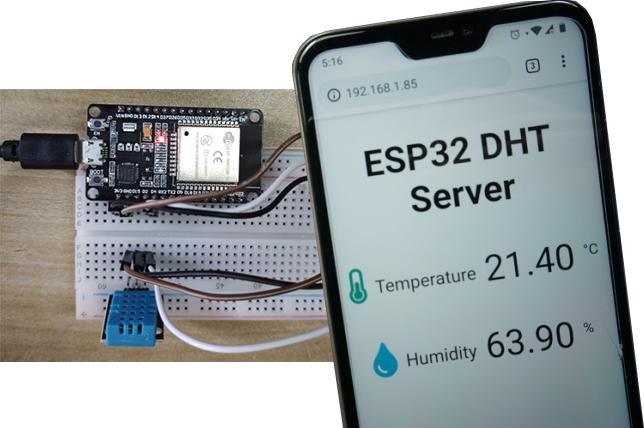
[DHT] Temperature: 21.4 C
[DHT] Humidity: 63.9 %
The improved logging prints labeled readings with units (the original printed a bare number), so you can confirm the sensor works before opening the page.
Internet note: the page pulls its thermometer/drop icons from a font CDN, so the viewing device needs internet for the icons (the numbers work regardless).
5 · Demonstration
6 · Troubleshooting
| Symptom | Likely cause | Fix |
|---|---|---|
Reads -- / "Failed to read" | Signal not on GPIO 4 / bad wiring | S → GPIO 4, + → 3.3 V, − → GND |
| Compile error (DHT/sensor) | Libraries missing | Install DHT + Adafruit Unified Sensor |
| Compile error (async) | Async libs missing | Install ESPAsyncWebServer + AsyncTCP |
| Icons missing on page | No internet on the phone | Numbers still work; give the device internet |
| Values never change | DHT11 is slow | Wait ~10 s between updates |